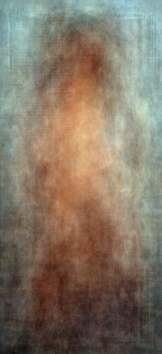
Back in 2003 Xeni Jardin posting on boingboing highlighted artist Jason Salavon's work involving averaging together Playboy centerfolds by decade. The works he produced were haunting and beautiful to me (and a little geeky, too).
Those four images represented the four decades from the 1960's to the 1990's (left to right). The prints were made with code that he wrote in C on Unix based SGI machines.
These "Amalgamations" (to coin his phrase), are simply stunning to me. So in the sincerest form of flattery, I had to see if I could replicate the results in some fashion with more modern tools (Jason began his work blending the Playboy images back in 1997).
My first thought was to approach this using GIMP. After a few tries and experimenting I found that a better approach would be to use ImageMagick instead. It's just better suited for this type of processing.
Let's have a look at the results before we delve into the ImageMagick commands...

Showing posts with label pinup. Show all posts
Showing posts with label pinup. Show all posts



Getting Around in GIMP - Contour Painting
Similar to using dodging and burning is something I like to call "Contour Painting". It's basically dodging and burning (d&b), but with an eye towards contours of the subject in a photo. I will use this very often in shots with skin, and a great example of this would be a nice cheesecake pin-up style image!

Lovely pin-up pose! (mouseover to see the final result)
First off, I want to thank Evolutions Photography for graciously allowing me to use this wonderful image as part of my tutorial. The model is the lovely Ariel Fulmer (Arielita on ModelMayhem). Make up artist is DmarieBelleza, and the hair stylist is Anna Marie De Almeida. I originally came across this image in the ModelMayhem Digital Art & Retouching Challenge forum in this thread.

Lovely pin-up pose! (mouseover to see the final result)
First off, I want to thank Evolutions Photography for graciously allowing me to use this wonderful image as part of my tutorial. The model is the lovely Ariel Fulmer (Arielita on ModelMayhem). Make up artist is DmarieBelleza, and the hair stylist is Anna Marie De Almeida. I originally came across this image in the ModelMayhem Digital Art & Retouching Challenge forum in this thread.
The rest of my GIMP tutorials are all listed here: Getting Around in GIMP
If you want to retouch the skin before contour painting, see this tutorial:
Skin Retouching (Wavelet Decompose)
If you want to retouch the skin before contour painting, see this tutorial:
Skin Retouching (Wavelet Decompose)
Subscribe to:
Posts (Atom)